How to Use Mona Flower Font Without Making These Common Mistakes
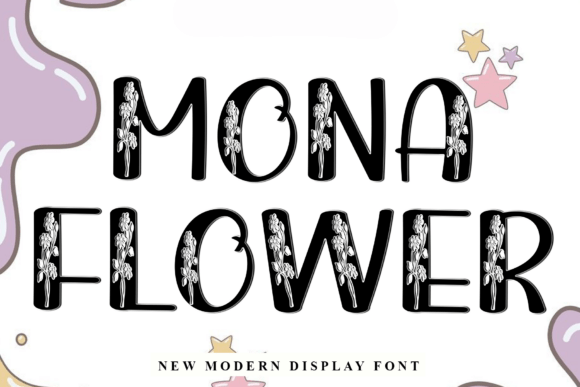
If you're looking to add a touch of elegance and creativity to your design projects, Mona Flower might already be on your radar. This modern display font, known for its intricate floral embellishments inside each character, is a favorite among designers working in wedding stationery, floral shop branding, and fashion labels. But like any specialty font, it comes with its own set of considerations — and missteps can cost you time, money, and design credibility.
What Makes Mona Flower Unique?
Mona Flower stands out due to its artistic integration of floral motifs within each letterform. It's not just a decorative font; it's a statement. Its bold structure combined with soft, blooming details makes it ideal for projects that need both presence and personality. However, that same uniqueness can become a liability if not used thoughtfully.
Mistake #1: Using Mona Flower in Inappropriate Contexts
While Mona Flower looks stunning in the right setting, it’s not a one-size-fits-all solution. Many designers fall into the trap of using it for body text or minimalist layouts, where its complexity becomes overwhelming or illegible.
- Problem: Reduced readability and visual clutter.
- Solution: Reserve Mona Flower for headlines, logos, or short phrases where its beauty can shine without compromising clarity.
Mistake #2: Overlooking Licensing Details
One of the most overlooked aspects when downloading or purchasing Mona Flower is the licensing agreement. Designers often assume the font is free for commercial use, only to later face legal issues or unexpected costs.
- Always verify the font's licensing terms before use.
- Check if web use, print, or app integration is included.
- Keep a record of your purchase or download source.
Why Font Pairing Matters More Than You Think
Mona Flower is a visual centerpiece, so pairing it with the wrong secondary fonts can lead to a disjointed design. A common mistake is using another decorative font alongside it, which results in visual competition rather than harmony.
Better approach: Choose clean, simple sans-serif or serif fonts like Montserrat, Lora, or Open Sans to complement Mona Flower without overshadowing it.
Mistake #3: Ignoring Kerning and Spacing
Because of its ornate nature, Mona Flower may require manual adjustments to spacing and kerning to ensure legibility and visual balance. Automatically spaced text can look awkward or crowded.
- Always preview your text at actual size before finalizing.
- Use design software that allows for fine-tuned kerning (like Adobe Illustrator or Figma).
- Don’t rely solely on default settings — adjust manually when needed.
Choosing the Right Format and Source
Where you get your Mona Flower font matters. Downloading from unverified sources can lead to corrupted files, missing glyphs, or even malware.
What to check:
- Is the provider reputable? Stick to trusted platforms like Creative Market, MyFonts, or Dafont.
- Does the package include all necessary weights and glyphs?
- Are there customer reviews or previews available?
Mistake #4: Using Mona Flower at the Wrong Size
This font is best suited for large-scale applications like posters, invitations, or digital headers. Using it too small — for example, in a business card tagline or website button — can cause the floral details to blur or become unreadable.
Tip: Test the font at the intended output size. If the embellishments start to lose clarity, consider a simpler alternative for that use case.
Designing for Different Mediums
Whether you're printing or designing for the web, Mona Flower behaves differently depending on the medium. For print, it adds a luxurious, handcrafted feel. For digital use, especially on mobile devices, you must ensure it renders clearly across browsers and screen resolutions.
Pro tip: If using on a website, convert the text to SVG or use web-safe fallback fonts to maintain visual consistency without sacrificing performance.
Mistake #5: Assuming It’s Universally Accessible
If you're sharing a design file with a client or collaborator who doesn’t have Mona Flower installed, the font may default to something generic or unreadable.
- Always embed the font or convert text to outlines before exporting PDFs.
- For web use, ensure the font is properly hosted or linked via a service like Google Fonts or Adobe Fonts.
When Mona Flower Isn’t the Best Choice
Despite its beauty, Mona Flower isn’t ideal for every project. If your design needs a clean, professional, or minimalist look — such as corporate reports, technical documents, or UI design — it’s better to opt for a more neutral font.
Ask yourself: Does the font enhance the message, or is it distracting from it?
Mistake #6: Not Testing in Context
Seeing Mona Flower in a font preview doesn’t always reflect how it will look in your actual design. It’s easy to fall in love with a sample without considering background colors, layout spacing, or surrounding design elements.
Smart strategy: Create a quick mockup or prototype before committing. Tools like Canva, Figma, or Photoshop can help you visualize the font in real-world use.
Final Thoughts: Make Mona Flower Work for You
Mona Flower is a powerful design tool when used correctly. By avoiding these common pitfalls — from licensing to legibility — you can ensure your work stands out for the right reasons. Always approach your font choices with intention, test thoroughly, and prioritize clarity alongside creativity.
Whether you're designing a wedding invitation, a boutique logo, or a seasonal campaign, remember that Mona Flower should enhance your message, not overpower it. With a little care and attention, this floral beauty can elevate your design from ordinary to unforgettable.