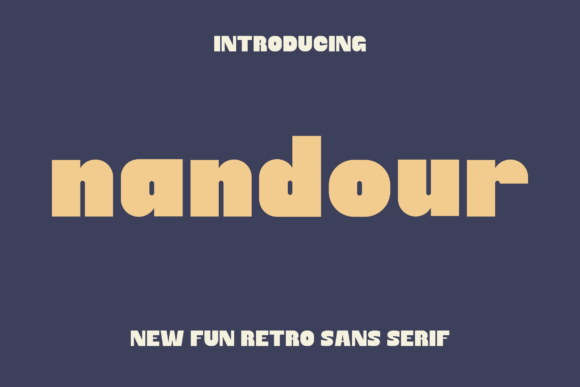
Nandour: A Modern Font with a Friendly Touch
If you're looking for a font that balances professionalism with warmth, Nandour might be exactly what you need. This sleek, rounded sans display typeface is designed to stand out without feeling cold or impersonal. Whether you're working on branding, packaging, or user interface design, Nandour brings a clean structure and soft edges that appeal to both modern aesthetics and human connection.
Why Nandour Stands Out
What makes Nandour unique is its thoughtful design. Unlike many display fonts that lean too far into either boldness or minimalism, Nandour strikes a middle ground. Its balanced proportions and open shapes make it readable even at larger sizes, while its rounded corners give it a friendly, approachable feel. This makes it especially useful in contexts where warmth and clarity are equally important—like social media graphics, editorial layouts, and digital product interfaces.
Common Mistakes When Using Nandour
Despite its versatility, Nandour isn't a one-size-fits-all solution. Many users fall into predictable traps when selecting or applying this font, often without realizing the impact on their final design.
1. Overusing Nandour in Long Text Blocks
One of the most common misuses of Nandour is applying it to large bodies of text. While it's highly readable at display sizes, its rounded nature and lack of serifs can make it less ideal for extended reading. This is especially true in print or on low-resolution screens where clarity matters more.
Better approach: Use Nandour for headlines, logos, or short captions. Pair it with a clean, legible sans-serif or serif font for body text to maintain readability without sacrificing style.
2. Ignoring Weight and Style Variations
Some designers assume that a single weight of Nandour will work across all their design elements. This can lead to visual imbalance, especially when trying to create hierarchy or contrast between headings, subheadings, and supporting text.
Better approach: If the font family includes multiple weights (like light, regular, bold), use them strategically. For example, a bold weight can command attention in a headline, while a lighter version works well in secondary text or background elements.
3. Mismatching Nandour with the Wrong Visual Style
Nandour’s rounded edges and modern structure give it a distinct personality. However, this personality can clash with certain design styles—especially those that are vintage, rustic, or overly formal.
Better approach: Consider the overall tone of your project. If you're designing a tech startup's landing page or a modern lifestyle brand, Nandour fits right in. But if your project leans toward a retro or luxury aesthetic, you may want to explore more stylistically appropriate alternatives.
Overlooked Details When Downloading or Buying Nandour
Before you commit to using Nandour in your project, it's important to double-check a few key details that many people overlook.
Check Licensing Terms
One of the most overlooked aspects of using any font is understanding its licensing. Some fonts are free for personal use but require a paid license for commercial projects. Others may have restrictions on how they can be used or distributed.
What to do: Always read the license agreement carefully. If you're unsure, reach out to the provider or look for a clear "Commercial Use" label.
Verify File Formats
Not all font downloads include the same file types. Some may only provide .otf or .ttf files, while others include web-optimized formats like .woff or .eot.
What to do: Make sure the package includes the formats you need. If you're using the font on a website, confirm it comes with web fonts and a proper @font-face kit.
Test for Cross-Platform Consistency
Fonts can render differently across operating systems and browsers. This is especially true for rounded or stylized typefaces like Nandour.
What to do: Test your design on multiple devices and browsers before finalizing. Use tools like Adobe XD, Figma, or browser extensions that let you preview how the font appears in different environments.
How to Compare Nandour with Similar Fonts
When choosing a font like Nandour, it's helpful to compare it with similar options to ensure you're making the best choice for your project. However, many people compare fonts based on appearance alone, ignoring important functional differences.
- Readability: How does Nandour hold up in different sizes and contexts compared to alternatives like Quicksand or Circular?
- Character Set: Does it support international characters or special symbols you may need?
- Spacing and Kerning: Does the font maintain good spacing across different weights and pairings?
Better approach: Create a small test layout with your top font options. Use the same text and design elements to see which one performs best under real-world conditions.
Getting the Most Out of Nandour
To truly benefit from Nandour’s strengths, consider how you apply it in your design system or brand identity. It’s not just about using the font—it's about using it thoughtfully.
For example, if you're building a mobile app, Nandour can serve as a clean, approachable UI font for buttons and headers. In branding, it can help communicate a sense of innovation and friendliness—especially when paired with minimalist visuals and soft color palettes.
But again, always test. Even the best fonts can fall short if not applied with intention.
Final Thoughts
Nandour is a versatile and stylish choice for modern design projects. Its rounded, friendly aesthetic makes it stand out in a sea of sterile sans serifs, while its clean structure ensures it remains professional and legible. By avoiding common mistakes—like misusing it in long text, ignoring licensing terms, or skipping cross-platform testing—you can make the most of what Nandour has to offer.
Always take the time to understand your font choices. After all, typography is one of the most powerful tools in visual communication. With a little care and attention, Nandour can help you create designs that are both effective and emotionally engaging.