Olive Bloom Split Monogram: A Designer’s Tool for Elegant Personalization
The Olive Bloom Split Monogram font, especially in its serif variant with olive branch flourishes, offers a refined aesthetic that blends botanical charm with structured typography. This font is more than a decorative choice—it’s a functional design asset that supports creative workflows in branding, event planning, and personalized product creation. Whether you're crafting wedding invitations, designing a rustic logo, or preparing Cricut-ready name cut files, Olive Bloom Split Monogram integrates seamlessly into both digital and physical production pipelines.
Understanding the Design Elements
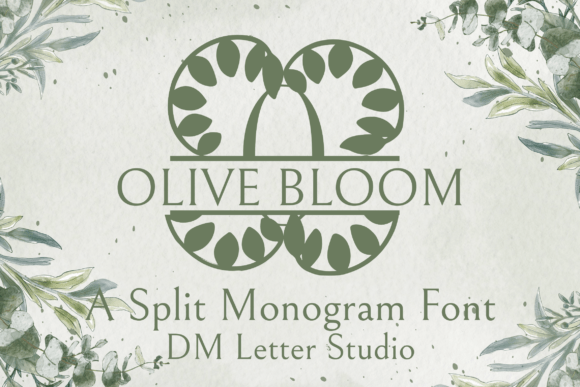
At its core, Olive Bloom Split Monogram is a serif font engineered for customization. Each uppercase letter is intentionally split, leaving space for inserting names, initials, or other text elements. This structural feature makes it ideal for monogramming, especially in projects that require a high degree of personalization without sacrificing elegance.
Complementing the split-letter design are hand-drawn olive branch illustrations. These flourishes are not merely ornamental; they serve as thematic anchors, especially for Mediterranean-inspired designs, botanical branding, or nature-themed events. The combination of clean serif letterforms and organic botanical elements creates a balanced visual language that appeals to both traditional and modern sensibilities.
Where Olive Bloom Fits in the Creative Workflow
Design workflows often involve multiple stages—from ideation and asset gathering to layout development and final production. Olive Bloom Split Monogram functions best when integrated early in the design phase, particularly when personalization and thematic consistency are key project goals.
- Pre-Design Research: Before selecting fonts, define the project’s tone and audience. Olive Bloom works well for upscale, nature-inspired, or heritage-themed visuals.
- Mockup Creation: Use the font in early mockups to test visual hierarchy and spacing, especially when overlaying names or initials in split-letter formats.
- Asset Preparation: For digital cutting tools like Cricut, ensure the font is properly converted into vector paths for accurate cutting.
Use Cases Across Industries
Olive Bloom Split Monogram finds application across a range of creative and commercial domains. Its versatility makes it a strong candidate for both personal and professional design work.
Wedding and Event Design
In wedding design, monogramming is a recurring theme—from save-the-dates to seating charts and custom favors. Olive Bloom’s split structure allows for dual-name integration, making it ideal for initials or couple names. The olive flourishes also align well with Mediterranean or rustic-themed weddings, offering a natural yet polished look.
Designers can use this font in Adobe Illustrator or Canva to create layered signage, digital invites, or printable decor. When paired with soft color palettes and organic textures, it enhances the overall aesthetic without overwhelming the layout.
Brand Identity and Packaging
Entrepreneurs and brand designers can incorporate Olive Bloom into logo systems that emphasize heritage, craftsmanship, or sustainability. The serif structure provides a sense of tradition, while the olive motifs subtly reinforce themes of growth, peace, or natural beauty.
For packaging, especially for olive oil, artisanal goods, or wellness products, this font can be used for label design, product tags, or branded thank-you cards. When used consistently across touchpoints, it contributes to a cohesive brand identity.
Digital and Physical Crafting
Cricut and Silhouette users benefit from Olive Bloom’s clear letter structure and open spacing. The font’s design makes it easy to cut and layer, especially when creating wall art, personalized gifts, or framed quotes.
When preparing files for cutting machines, ensure that the font is converted to outlines to prevent distortion. Test prints or sample cuts on scrap material can help refine spacing and alignment before final production.
Integrating Olive Bloom with Other Tools
Successful implementation of Olive Bloom Split Monogram depends on how well it interacts with other design tools and assets. Here are practical ways to integrate it smoothly:
- Adobe Creative Suite: Use in Illustrator for vector work or Photoshop for layered compositions. Pair with soft textures or watercolor backgrounds to enhance its organic appeal.
- Canva and Figma: Ideal for non-designers or quick mockups. Ensure the font is embedded properly when sharing files with clients or collaborators.
- Cricut Design Space: Import the font as a system font or use web-based versions. Always check spacing and kerning after importing to maintain design integrity.
Best Practices for Consistent Results
Like any design element, Olive Bloom Split Monogram performs best when used with intention and consistency. Here are key considerations for maintaining quality and usability across projects:
- Font Licensing: Verify that the font is licensed for both personal and commercial use, especially if used in client work or product creation.
- File Management: Keep font files organized in a centralized folder to avoid duplication or missing assets during team collaborations.
- Color and Contrast: Use high-contrast combinations (e.g., dark text on light background) to ensure legibility, especially in printed or cut formats.
- Testing and Proofing: Always create test prints or sample cuts before final production to check spacing, alignment, and overall appearance.
Scaling and Long-Term Use
One of the advantages of Olive Bloom Split Monogram is its adaptability across different project scales. Whether you're designing a single name tag or an entire wedding suite, the font maintains its elegance and clarity.
For long-term branding or recurring events, consider creating reusable templates that incorporate the font. This not only saves time but also ensures visual consistency. Additionally, maintaining a design system with defined font sizes, spacing rules, and layout grids can streamline future use.
Conclusion: A Thoughtful Addition to Your Design Toolkit
Olive Bloom Split Monogram isn’t just a font—it's a design solution that supports personalization, thematic storytelling, and workflow efficiency. Whether you're a professional designer, a small business owner, or a DIY enthusiast, integrating this font into your creative process can elevate your output with minimal effort.
By understanding its structure, planning for compatibility, and applying it thoughtfully within your design or production workflow, Olive Bloom becomes more than a stylistic choice—it becomes a functional asset that enhances both aesthetics and execution.