Hoppy Summer: A Cheerful Font with Hidden Considerations
What Makes Hoppy Summer Stand Out?
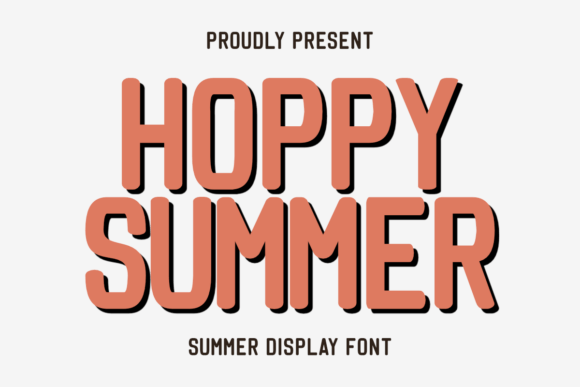
Hoppy Summer is a bold, rounded display font designed to evoke a soft retro vibe while delivering a cheerful, summery feel. It’s commonly used by creators across various platforms—from print-on-demand sellers to Cricut crafters—for summer-themed designs on t-shirts, mugs, tote bags, and more. Its PUA encoding makes it easy to access special glyphs and symbols, and its playful aesthetic suits everything from beach quotes to branding for seasonal events.
While many fonts aim for versatility, Hoppy Summer leans into its personality. That’s both its strength and potential pitfall. If you’re not careful, what looks vibrant and fun on screen might become overwhelming or hard to read in print.
Common Missteps When Using Hoppy Summer
Many designers and creators jump into using Hoppy Summer because of its sunny personality and the way it stands out. But without a thoughtful approach, this font can unintentionally work against your design goals.
1. Overusing the Font in Multi-Layered Designs
One of the most frequent mistakes is using Hoppy Summer as the only font in layered or complex designs. Because of its bold and rounded nature, it can easily dominate a layout, making other elements feel lost or unbalanced.
Better approach: Pair Hoppy Summer with a clean, minimalist sans-serif or a complementary script font. For example, use it for headlines or quotes and a thinner font for supporting text like dates or locations.
2. Ignoring Context and Application
Another overlooked detail is the context in which the font will be used. Hoppy Summer works well for t-shirts, mugs, and party invitations—but not all design mediums suit it equally. Some creators have found that its rounded edges and soft lines can blur at smaller sizes, especially on low-resolution prints.
Practical tip: Always test Hoppy Summer at the intended size and resolution. If you're designing for a sublimation project or a printed label, make sure to view a physical proof before finalizing your layout.
3. Assuming PUA Encoding Means Full Glyph Coverage
Many users assume that because Hoppy Summer is PUA encoded, it includes all the special characters and symbols they might need. However, PUA encoding simply allows for custom glyph access—it doesn’t guarantee that every letter, accent, or punctuation mark is included in the font file.
What to check: Before purchasing or downloading, review the font's character map or test it in your design software. Make sure it includes the necessary accents if you're designing for international use or multilingual content.
Designing with Hoppy Summer: What to Watch For
When working with any display font—especially one as stylized as Hoppy Summer—it’s easy to overlook how spacing, kerning, and alignment affect the final output. Here are a few things to consider:
- Spacing: The rounded letters can create optical spacing issues. For instance, “AV” or “WA” might visually appear too close or too far apart unless manually adjusted.
- Kerning: Don’t rely solely on auto-kerning features in your design software. Manually tweak spacing for a polished look, especially in logo work or signage.
- Legibility: Avoid using Hoppy Summer for long paragraphs or small-sized text. It’s best suited for headlines, short quotes, and visual accents.
4. Misjudging File Formats and Licensing
Some creators download Hoppy Summer from third-party sites without verifying the file format or licensing terms. This can lead to compatibility issues or legal concerns, especially if the font is used in commercial projects without proper authorization.
Smart move: Always purchase or download Hoppy Summer from a reputable source. Check if it includes the necessary file types (OTF, TTF) and confirm whether the license allows for commercial use, especially if you're a POD seller or small business owner.
5. Failing to Preview in Context
It’s easy to fall in love with how Hoppy Summer looks on your screen. But colors, materials, and printing methods can drastically change how the font appears in real life.
Real-world example: A t-shirt design using Hoppy Summer in bright yellow on a light background might look crisp on screen, but when printed on a textured fabric, the edges can appear fuzzy. Always preview your design on the intended medium, and if possible, create a sample print before mass production.
Choosing and Using Hoppy Summer Wisely
Before diving into your next design project with Hoppy Summer, take a moment to consider the following:
- Intended Use: Is this for a seasonal logo, a beach-themed quote, or an event invitation? Make sure the font’s tone matches your message.
- Color Contrast: High contrast between the font and background helps maintain readability. Avoid light-on-light or dark-on-dark combinations unless you’re using an outline or shadow effect.
- Software Compatibility: Test Hoppy Summer in your preferred design software—whether it’s Canva, Adobe Illustrator, or Cricut Design Space—to ensure all glyphs and spacing behave as expected.
- Font Pairing: Try pairing it with Montserrat, Lato, or a handwritten script like Great Vibes for a balanced look that doesn’t feel cluttered.
Final Thoughts: Keep It Cheerful, Not Chaotic
Hoppy Summer is a fantastic choice for creators looking to inject a playful, retro summer vibe into their work. But like any stylized font, it requires thoughtful application to avoid unintended consequences.
By understanding its limitations, testing thoroughly, and pairing it wisely with other design elements, you can make the most of what Hoppy Summer offers—without letting it overshadow your message.
Whether you're crafting a beach-themed t-shirt or designing a vibrant social media graphic, remember: the goal is to enhance your design, not overwhelm it. And with the right approach, Hoppy Summer can be your go-to font for all things sunny and stylish.